Test selection examples
Test selection works a little differently from other resource selection. This makes it very easy to:
- run tests on a particular model
- run tests on all models in a subdirectory
- run tests on all models upstream / downstream of a model, etc.
Like all resource types, tests can be selected directly, by methods and operators that capture one of their attributes: their name, properties, tags, etc.
Unlike other resource types, tests can also be selected indirectly through relationships in your DAG. If a selection method or operator includes a model that a test depends on, dbt will also select that test. For example, when you run dbt test --select model_b, dbt includes tests defined on model_b as well as tests on related models (like model_a) that reference model_b.See the next section for more details on controlling this behavior.
Test selection is powerful, and we know it can be tricky. To that end, we've included lots of examples below:
Direct selection
Run generic tests only:
dbt test --select "test_type:generic"
Run singular tests only:
dbt test --select "test_type:singular"
In both cases, test_type checks a property of the test itself. These are forms of "direct" test selection.
Indirect selection
Indirect selection modes control which tests run based on the models you select and their relationships in your DAG. These modes determine how dbt handles tests that reference your selected models, either directly or through upstream/downstream relationships.
You can use the following modes (with eager as the default). Test exclusion is always greedy: if ANY parent is explicitly excluded, the test will be excluded as well.
The buildable and cautious modes can be useful when you're only building a subset of your DAG, and you want to avoid test failures in eager mode caused by unbuilt resources. You can also achieve this with deferral.
Eager mode (default)
Most inclusive and runs tests if any of the parent nodes are selected, regardless of whether all dependencies are met. This includes any tests that reference the selected nodes, even if they also reference other unselected nodes.
For example, if you run dbt test --select model_b, eager mode will run:
- Tests directly on
model_b - Tests in upstream models (like
model_a) that referencemodel_b - Tests in downstream models that reference
model_b
dbt builds models that depend on the selected model. In this mode, any tests depending on unbuilt resources will raise an error.
Buildable mode
Buildable mode is a middle ground between cautious and eager, running only tests that reference selected nodes (or their ancestors). This mode is slightly more inclusive than cautious by including tests whose references are each within the selected nodes (or their ancestors). This mode is useful when a test depends on a model and a direct ancestor of that model, like confirming an aggregation has the same totals as its input.
Cautious mode
Cautious is the most exclusive mode and ensures that tests are executed and models are built only when all necessary dependencies of the selected models are met. Restricts tests to only those that exclusively reference selected nodes. Tests will only be executed if all the nodes they depend on are selected, which prevents tests from running if one or more of its parent nodes are unselected and, consequently, unbuilt.
Empty mode
Empty mode runs no tests and restricts the build to the selected node, ignoring all indirect dependencies. It doesn't execute any tests, whether they are directly attached to the selected node or not. The empty mode is automatically used for interactive compilation.
Indirect selection examples
To visualize these methods, suppose you have model_a, model_b, and model_c and associated data tests. The following illustrates which tests will be run when you execute dbt build with the various indirect selection modes:
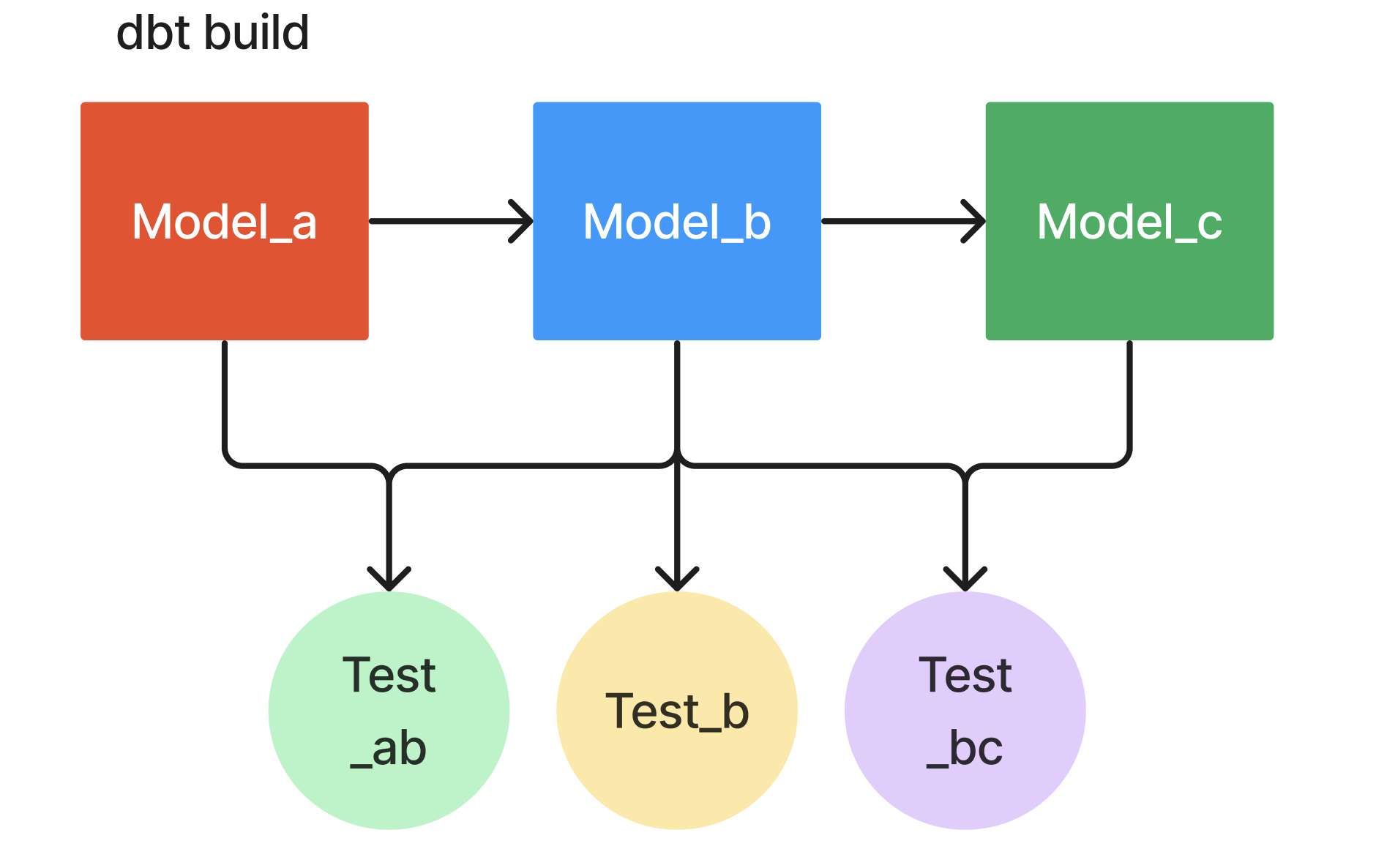 dbt build
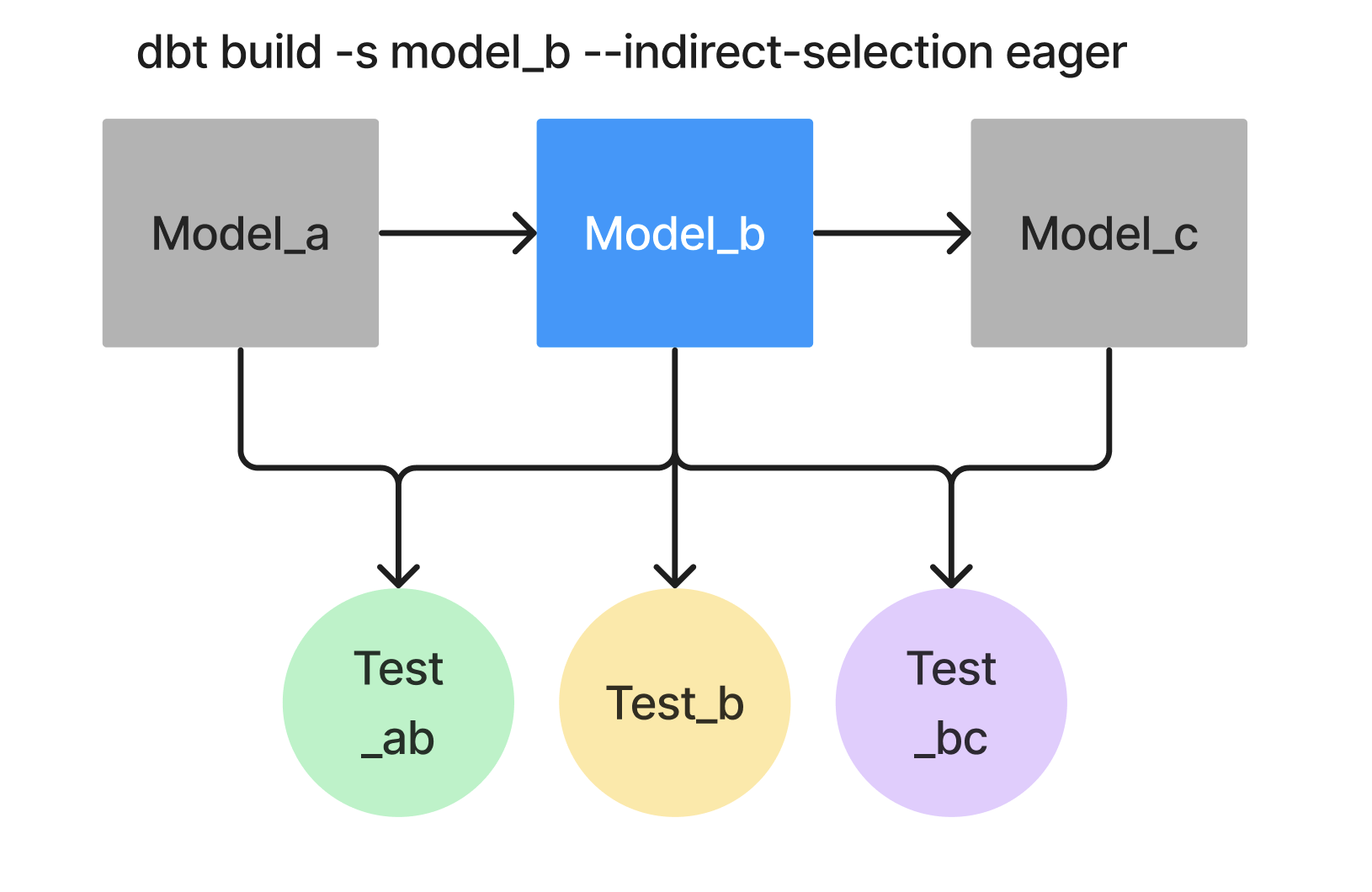 Eager (default)
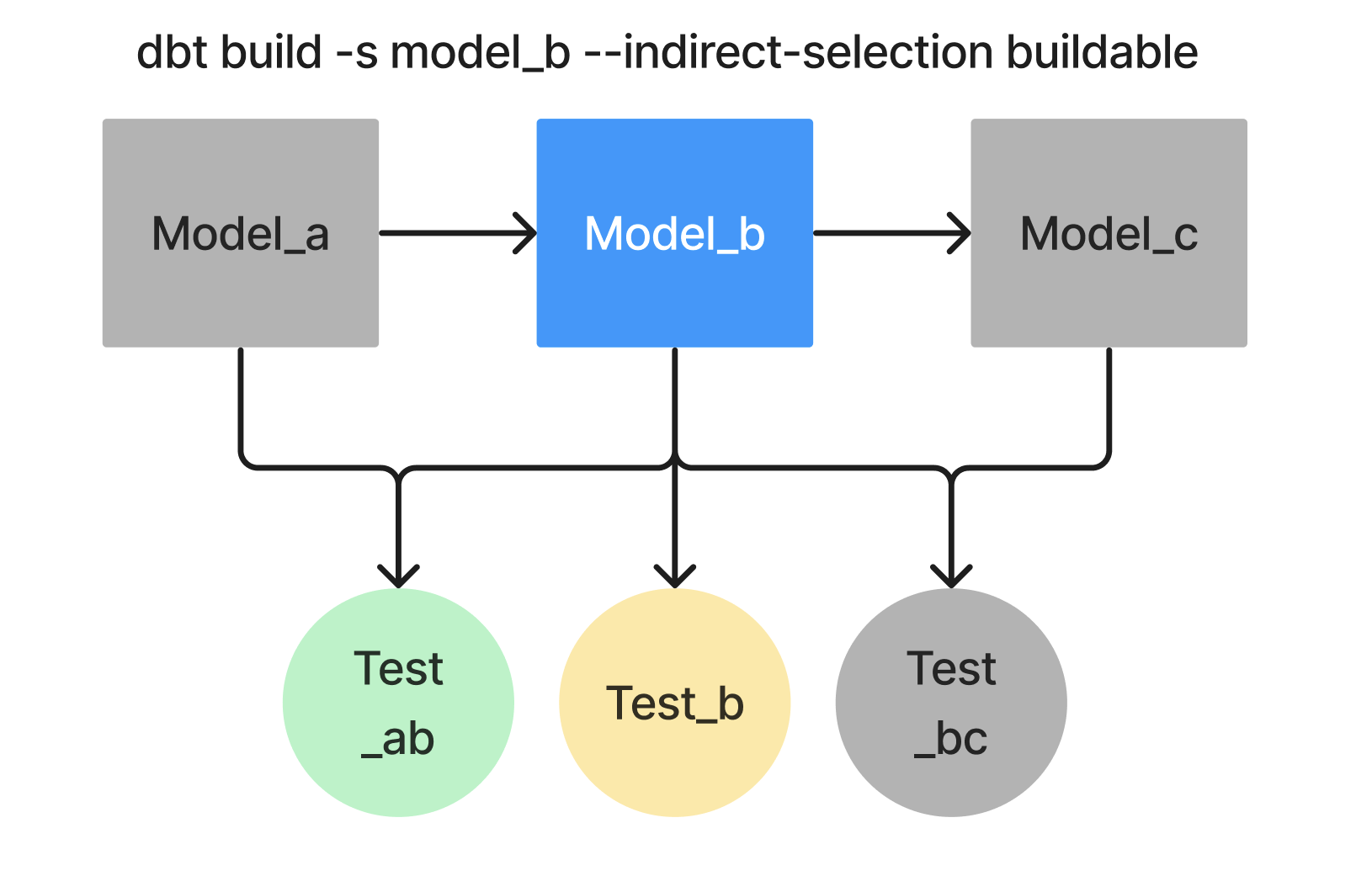 Buildable
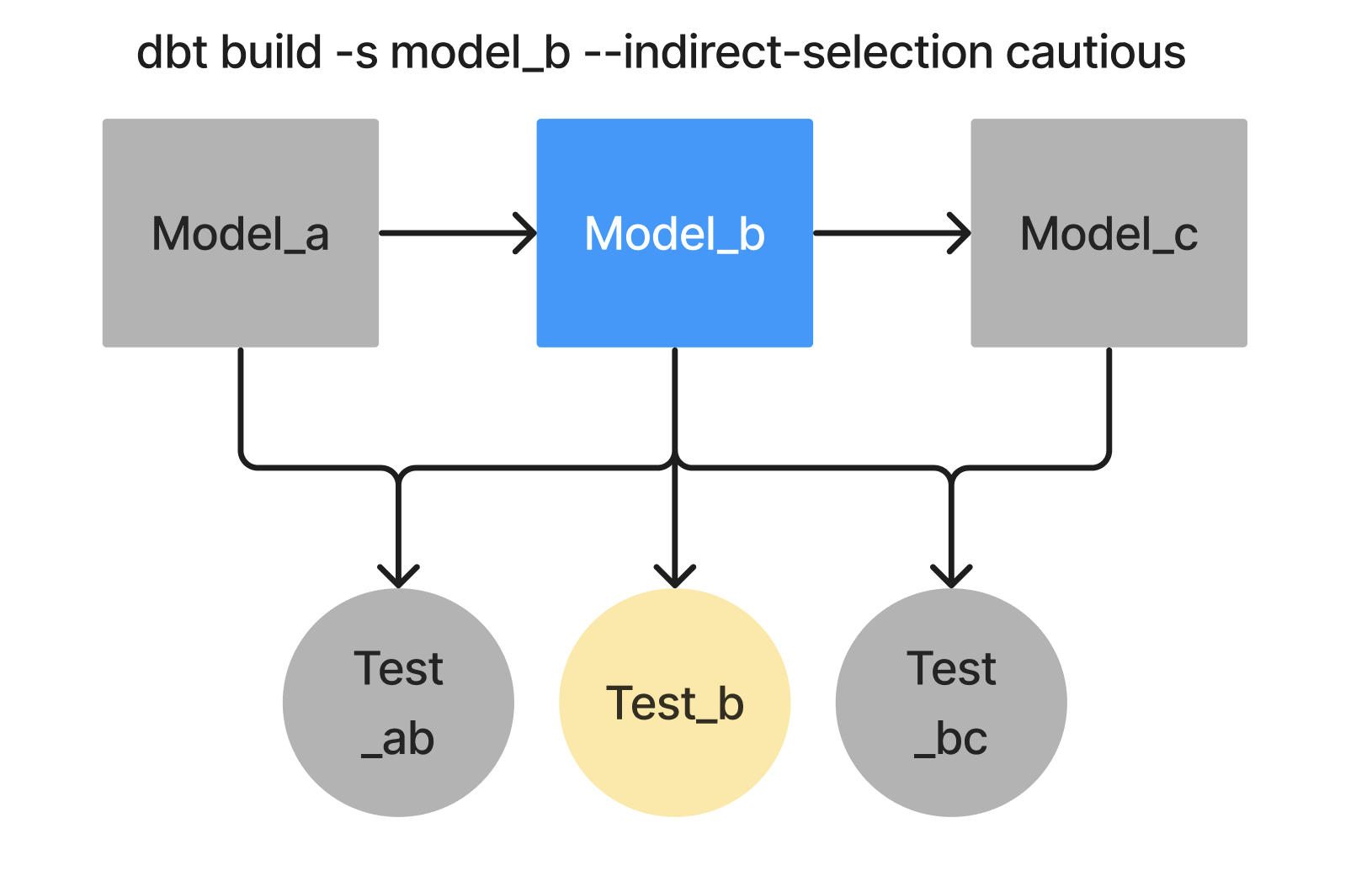 Cautious
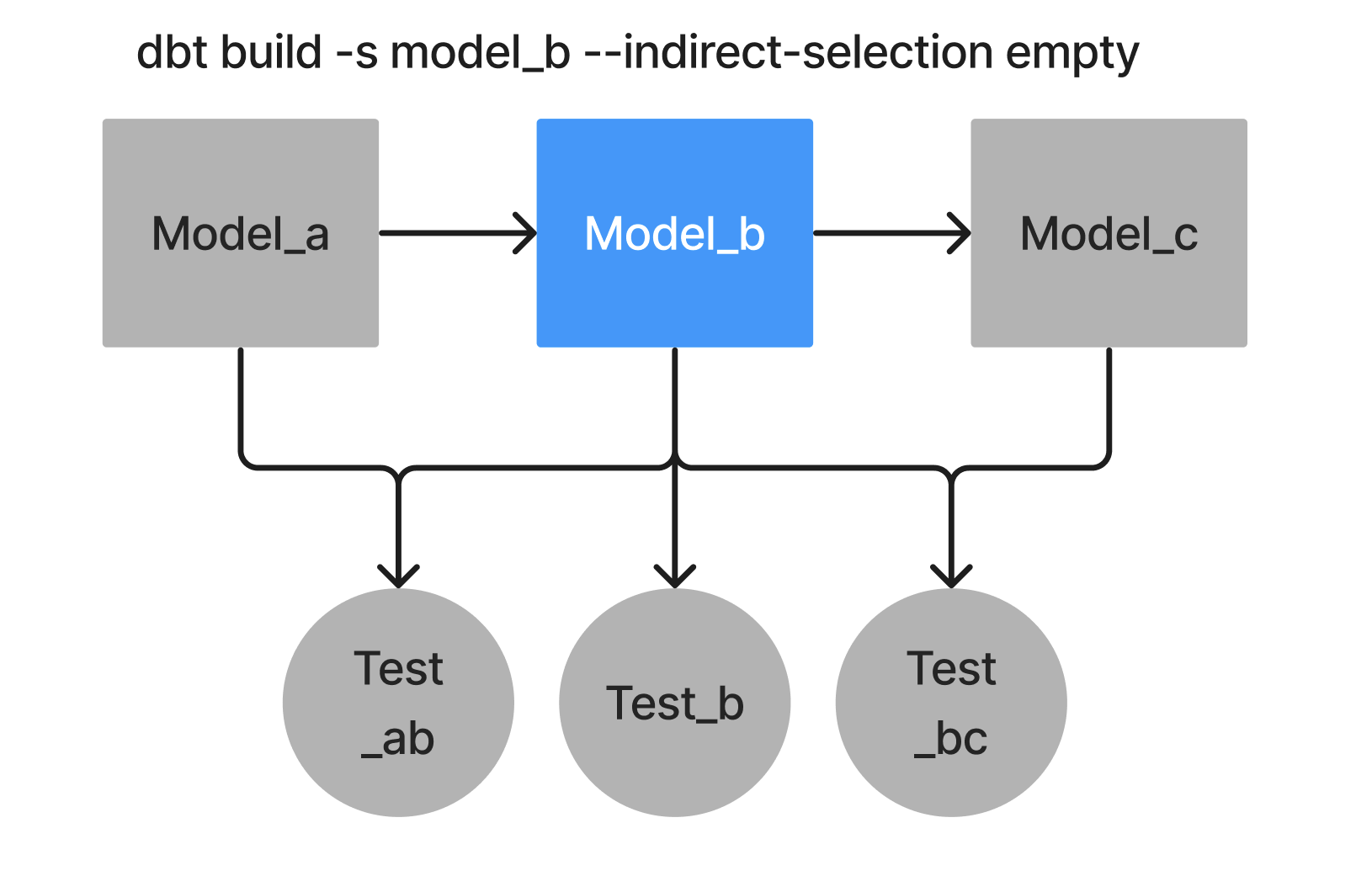 Empty
Empty- Eager mode (default)
- Buildable mode
- Cautious mode
- Empty mode
In this example, during the build process, any test that depends on the selected "orders" model or its dependent models will be executed, even if it depends other models as well.
dbt test --select "orders"
dbt build --select "orders"
In this example, dbt executes tests that reference "orders" within the selected nodes (or their ancestors).
dbt test --select "orders" --indirect-selection=buildable
dbt build --select "orders" --indirect-selection=buildable
In this example, only tests that depend exclusively on the "orders" model will be executed:
dbt test --select "orders" --indirect-selection=cautious
dbt build --select "orders" --indirect-selection=cautious
This mode does not execute any tests, whether they are directly attached to the selected node or not.
dbt test --select "orders" --indirect-selection=empty
dbt build --select "orders" --indirect-selection=empty
Test selection syntax examples
Setting indirect_selection can also be specified in a yaml selector.
The following examples use eager mode by default for indirect selection, unless you specify another mode (like --indirect-selection=cautious).
The selection operators (+, tags, and so on) determine which models are selected; the indirect selection mode determines which tests run for those models.
# Run tests on a model (indirect selection)
dbt test --select "customers"

# Run tests on two or more specific models (indirect selection)
dbt test --select "customers orders"

# Run tests on all models in the models/staging/jaffle_shop directory (indirect selection)
dbt test --select "staging.jaffle_shop"

# Run tests downstream of a model (note this will select those tests directly!)
dbt test --select "stg_customers+"

# Run tests upstream of a model (indirect selection)
dbt test --select "+stg_customers"

# Run tests on all models with a particular tag (direct + indirect)
dbt test --select "tag:my_model_tag"

# Run tests on all models with a particular materialization (indirect selection)
dbt test --select "config.materialized:table"

# To change the indirect selection mode, add the flag:
dbt test --select "customers" --indirect-selection=cautious
The same principle can be extended to tests defined on other resource types. In these cases, we will execute all tests defined on certain sources via the source: selection method:
# tests on all sources

dbt test --select "source:*"

# tests on one source
dbt test --select "source:jaffle_shop"

# tests on two or more specific sources
 dbt test --select "source:jaffle_shop source:raffle_bakery"

# tests on one source table
dbt test --select "source:jaffle_shop.customers"

# tests on everything _except_ sources
dbt test --exclude "source:*"
More complex selection
Through the combination of direct and indirect selection, there are many ways to accomplish the same outcome. Let's say we have a data test named assert_total_payment_amount_is_positive that depends on a model named payments. All of the following would manage to select and execute that test specifically:
dbt test --select "assert_total_payment_amount_is_positive" # directly select the test by name
dbt test --select "payments,test_type:singular" # indirect selection, v1.2
As long as you can select a common property of a group of resources, indirect selection allows you to execute all the tests on those resources, too. In the example above, we saw it was possible to test all table-materialized models. This principle can be extended to other resource types, too:
# Run tests on all models with a particular materialization
dbt test --select "config.materialized:table"

# Run tests on all seeds, which use the 'seed' materialization
dbt test --select "config.materialized:seed"

# Run tests on all snapshots, which use the 'snapshot' materialization
dbt test --select "config.materialized:snapshot"
Note that this functionality may change in future versions of dbt.
Run tests on tagged columns
Because the column order_id is tagged my_column_tag, the test itself also receives the tag my_column_tag. Because of that, this is an example of direct selection.
models:
  - name: orders
    columns:
      - name: order_id
        config:
          tags: [my_column_tag] # changed to config in v1.10 and backported to 1.9
        data_tests:
          - unique
dbt test --select "tag:my_column_tag"
Currently, tests "inherit" tags applied to columns, sources, and source tables. They do not inherit tags applied to models, seeds, or snapshots. In all likelihood, those tests would still be selected indirectly, because the tag selects its parent. This is a subtle distinction, and it may change in future versions of dbt.
Run tagged tests only
This is an even clearer example of direct selection: the test itself is tagged my_test_tag, and selected accordingly.
models:
  - name: orders
    columns:
      - name: order_id
        data_tests:
          - unique:
            config:
              tags: [my_test_tag] # changed to config in v1.10
dbt test --select "tag:my_test_tag"
Was this page helpful?
This site is protected by reCAPTCHA and the Google Privacy Policy and Terms of Service apply.